myWeatherPanel
A Raspberry Pi that shows weather and news headlines on an RGB LED matrix.
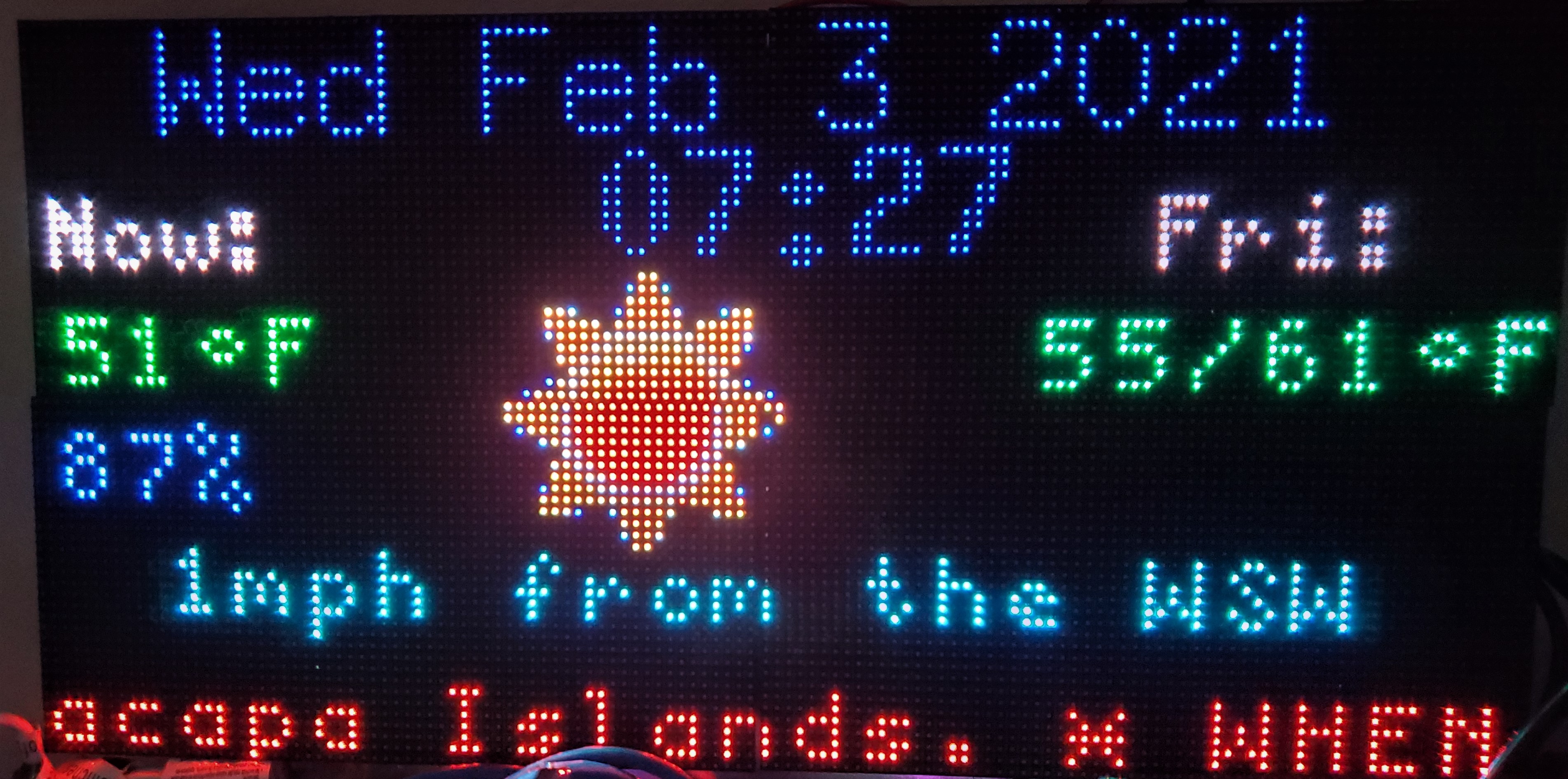
WeatherPanel
My wife is always wondering about the weather: is it going to be too hot today, too humid, and what about the rest of the week? So I decided to build her an LED panel display that would answer all her questions and give me an excuse to learn about LED panels.
Ok, full disclosure, the lockdown was driving me nutz and I really didn’t care all that much about the weather, I just needed something to do.
This work is based largely on the work of others and I try to give credit where I can.
Overview
This project is written in python3 and was developed on a Raspberry Pi 3B+, but almost any Wi-Fi capable Pi will do. I actually run it on a Raspberry Pi Zero WH. The project evolved as I learned more about LED panels and about writing larger python programs, so I am sure there are places where the code could be better; feedback is welcome. Here is an example of what the completed project looks like.
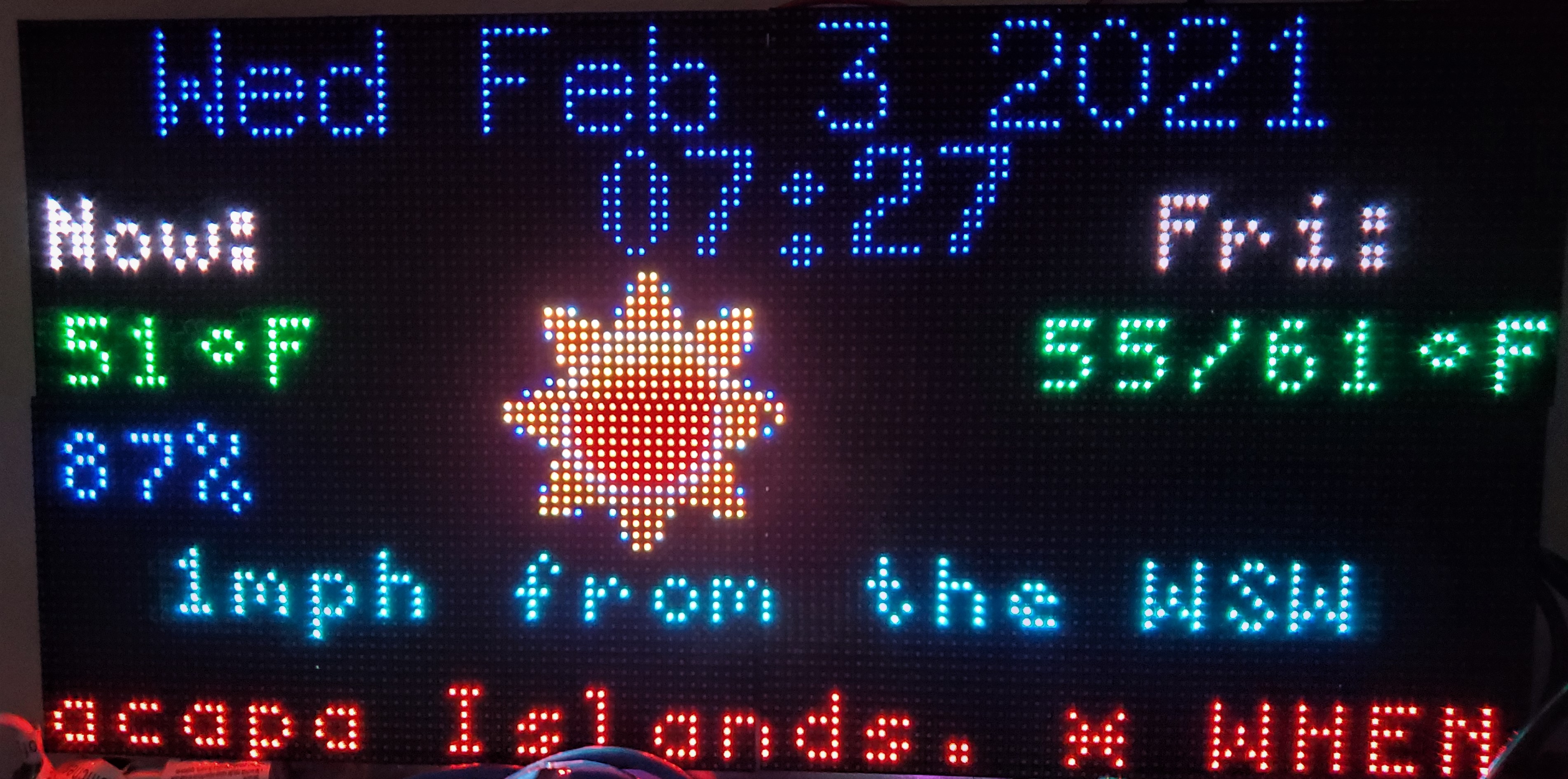
- Top left is the date; below it,
Now:with today’s temperature and humidity. - The center shows the clock, with a weather icon below it.
- The right side shows a day label that cycles through the week (
Today, then each weekday, about one every 10 seconds) with that day’s high/low; the icon changes to match the day being shown. - Below the clock is the current wind speed and direction.
- The bottom line scrolls, alternating between:
- active weather alerts for your location (from the US National Weather Service), and
- news headlines pulled from the RSS feeds in the config file.
Everything is driven by a plain-text config file (weatherPanel.cfg); no code changes are needed to point it at your location or your choice of news feeds.
Where the data comes from
- Weather – Open-Meteo. Free, no account, no API key. It is backed by national weather-service models, so the forecast is accurate. The panel requests current conditions plus a 7-day daily forecast.
- Weather alerts – US National Weather Service. Also free and key-less. Alerts are US-only; outside the US that request simply returns nothing and the panel runs fine without alerts.
- Weather icons – small PNGs are downloaded once from
openweathermap.org/img/w/(no key needed) and cached in theicons/directory. WMO weather codes from Open-Meteo are mapped to the matching icon. - News – any number of RSS/Atom feeds you list in the config, parsed with
feedparser. Only today’s headlines from each feed are shown.
Hardware
All of these can be ordered from Amazon, AdaFruit, or DigiKey among others.
- 4 pcs. 64x32 LED panels with magnetic feet (I used a 4mm pitch — that is the distance between LEDs)
- 2 pcs. power supplies for the LED panels (I used ALITOVE 5V 15A supplies, which are made for LED panels)
- 1 pc. Raspberry Pi with Wi-Fi (developed on a Pi 3B+ for speed, runs in production on a Pi Zero WH)
- 1 pc. AdaFruit RGB Matrix Bonnet for Raspberry Pi
- 1 pc. M3 male-female brass spacer/standoff & stainless screw/nut assortment kit (optional)
- 8 pcs. mini-magnet feet for RGB LED matrix (optional)
- 5 pcs. 16-pin flat ribbon cable, female connectors, 30cm, 2.54mm pitch (optional)
- 2 pcs. 6"x18" steel sheets (optional)
- 1 pc. SD card with the latest Raspberry Pi OS on it
I do not have any wood/metalworking abilities or facilities, so the optional items were used to mount the LED panels without a custom frame.
Software
Update the Pi
Before installing anything, make sure the Pi is up to date:
sudo apt-get update
sudo apt-get -y full-upgrade
Get the weatherPanel application
Create a directory on your Pi and clone this repository into it:
git clone <repository url from github>
That creates a myWeatherPanel directory containing the application.
Build and install the hzeller RGB matrix library
The panel is driven by hzeller/rpi-rgb-led-matrix. I strongly recommend reading through that project’s documentation — it is full of useful information on configuring and using LED panels.
cd ~/                # or wherever you want the library
git clone https://github.com/hzeller/rpi-rgb-led-matrix.git
cd rpi-rgb-led-matrix
sudo make
cd bindings/python
Then follow the instructions in that directory’s README.md to install the python3 bindings (this provides the rgbmatrix module).
The samplebase.py in this repo is a vendored copy of the helper from that library’s python samples.
Python packages
sudo pip3 install feedparser numpy Pillow requests
(numpy, Pillow, and requests are often already present on Raspberry Pi OS; feedparser usually is not.)
Configuration
Edit sample_weatherPanel.cfg and save it as weatherPanel.cfg in the application directory. The file has four sections.
[WEATHER]
| key | meaning |
|---|---|
lat |
latitude of the location you want the weather for |
lon |
longitude of that location |
units |
imperial (°F, mph) or metric (°C, km/h) |
No API key is required.
[LED]
These are the hzeller library options for your panel arrangement. The defaults in the sample match a 2x2 array of 64x32 panels on an AdaFruit bonnet:
cols = 64
rows = 32
chain_length = 4
parallel = 1
hardware_mapping = adafruit-hat
pixel_mapper_config = U-mapper
Only these six keys are read. The app does not parse --led-* command-line flags — anything else must be changed in the code.
[RSS]
feed = https://news.google.com/rss/headlines/section/geo/Los+Angeles?hl=en-US&gl=US&ceid=US:en
     https://news.google.com/rss/headlines/section/topic/NATION?hl=en-US&gl=US&ceid=US:en
     https://feeds.npr.org/1001/rss.xml
     https://feeds.bbci.co.uk/news/world/rss.xml
     https://www.aljazeera.com/xml/rss/all.xml
- One URL per line, each continuation line indented under
feed =. - The panel rotates through the feeds one at a time; the sample list covers local, national, and international news.
- Change the first (local) feed to your own area. In a Google News
geo/URL, use+for spaces. - Only headlines from the last 24 hours are scrolled.
[MISC]
All optional.
| key | default | meaning |
|---|---|---|
verbose |
False |
print extra diagnostic output |
weatherTimeOut |
600 |
seconds to show weather alerts before returning to the news ticker |
rssTimeOut |
1800 |
seconds to show one feed before rotating to the next |
Running it
chmod +x weatherPanel.py     # once
sudo ./weatherPanel.py
sudo is required because the hzeller library needs direct GPIO access. The
config file, icons/, and fonts/ are located next to weatherPanel.py, so it
can be started from any directory.
Running from cron
run.sh starts the application in the background; stop.sh kills it. For example, to run it from 6am to 9pm and start it on every boot:
@reboot          /home/pi/myWeatherPanel/run.sh
0 6   * * *      /home/pi/myWeatherPanel/run.sh
0 21  * * *      /home/pi/myWeatherPanel/stop.sh
Adjust the paths to wherever you cloned the repo.