tcamViewerDesktop
A Linux/desktop viewer for the tCam thermal imaging camera — a Compose Multiplatform Desktop port of tcamViewer2.
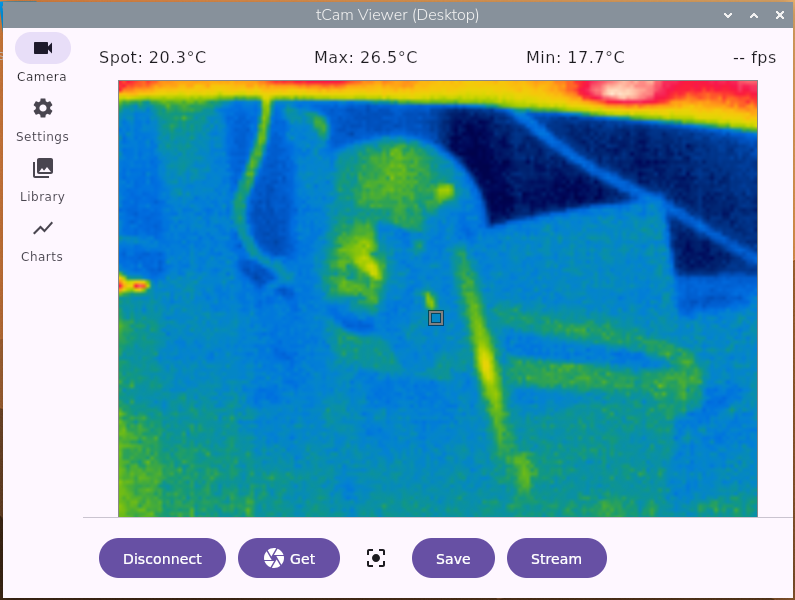
tcamViewerDesktop
Desktop viewer (Linux and Windows) for the tCam thermal imaging camera — a Compose Multiplatform Desktop port of tcamViewer2 (the Android app).
Connects to a tCam over WiFi/TCP (port 5001), decodes its JSON-framed radiometric + telemetry frames, applies a color palette, and displays live thermal video with spotmeter/region temperature readout.
Build & run
./gradlew run
Package a native installer
# Linux
./gradlew packageDeb
./gradlew packageRpm
./gradlew packageAppImage

# Windows (run on a Windows machine; requires WiX Toolset for .msi, Inno Setup for .exe)
gradlew.bat packageMsi
gradlew.bat packageExe
Status
Ported from tcamViewer2’s Android source: the TCP protocol layer (net/CameraService.kt),
radiometric/telemetry decode + palette mapping (util/CameraUtils.kt, model/ImageDto.kt),
and the full view-model (model/CameraViewModel.kt) — connect/disconnect with auto-reconnect,
an idle-connection health check (get_status poll every 60s) alongside the streaming-side dead-
connection watchdog, live streaming, point spotmeter + region measurement, AGC/manual-range/
palette/units control, temperature-over-time history (capped at 10,000 samples, with a Stop/
Resume control independent of Clear), temperature alerts, single-frame save, recording
(.tmjsn, with legacy .mtjsn files still recognized), and time-lapse capture (.tltjsn).
The UI has four tabs behind a NavigationRail (ui/App.kt):
- Camera (
ui/CameraScreen.kt) — connect/Get/Stream/Record/Save, a flat field correction (FFC) button that sends arun_ffccommand to manually trigger the Lepton’s calibration, the live thermal image with spotmeter tap-to-move / region drag-to-move-or-resize overlay, temperature readouts, and the temperature-history chart. - Settings (
ui/SettingsScreen.kt) — staged Save/Cancel editing (mirrors the Android app’s pattern) over camera IP, a Saved Cameras quick-connect list (every camera found or connected to, most-recent first) with an Auto-connect-on-launch toggle, an mDNS “Find tCam Devices” search button, palette, units, manual range, shutter sound, spotmeter/region toggle, temperature alerts, and — while connected — AGC/emissivity/gain mode and a WiFi config dialog with SSID scanning (nmclion Linux,netshon Windows — gracefully falls back to an empty, manually- typeable list if the platform tool is unavailable), plus Update Firmware…, which checks danjuliodesigns.com for the latest tCam / tCam-Mini release and installs it over the air (or installs a.binyou pick yourself). Switching tabs away from Settings with unsaved changes asks to confirm. - Library (
ui/LibraryScreen.kt) — browses saved.tjsnframes,.tmjsnrecordings, and.tltjsntime lapses grouped by date folder, multi-select delete, a date-range filter, a full-size browse view with Export-to-PNG, frame-by-frame video playback (ui/VideoPlayerWindow.kt) with skip ±5, play/pause, and speed control for time lapses, and (on a full tCam with a micro-SD card) a “Download from camera” browser (ui/CameraDownloadWindow.kt) for pulling images straight off the camera’s filesystem. - Charts (
ui/ChartsScreen.kt) — browses saved.tcharttemperature-history files the same way, with a full chart view on browse.
mDNS discovery (net/CameraDiscovery.kt) uses JmDNS — the
desktop JVM has no built-in mDNS/DNS-SD client the way Android’s NsdManager provides one. On a
multi-homed machine (wired + WiFi both up), a plain JmDNS.create() picks one interface and can
silently miss cameras reachable only on the other, so discovery binds a separate JmDNS instance
to every active non-loopback IPv4 interface and merges the results. It’s also wired into
CameraViewModel’s auto-reconnect: after retrying the last-known IP a few times, it falls back
to a fresh mDNS scan in case the camera’s DHCP lease changed. WiFi SSID scanning
(util/WifiScanner.kt) shells out to nmcli (Linux) or netsh (Windows) for the same reason —
no portable desktop WiFi-scan API exists the way Android’s WifiManager provides one.
Composite image export (util/CompositeExport.kt) — the colorized image plus header/sidebar
(color bar, spotmeter arrow, max/min)/footer (gain, emissivity, date/time) chrome — is ported
from Android’s buildShareBitmap(), saving to ~/tCamViewer/Exports/ (%USERPROFILE%\tCamViewer\ Exports\ on Windows) instead of Android’s gallery share sheet (no desktop equivalent of
Intent.ACTION_SEND).
Not yet ported from the Android app:
- MP4 export/share for recordings and time lapses (Android’s
VideoExporterusesMediaCodec; no portable desktop video encoder wired up) - Fullscreen toggle in the video player
Saved files land under ~/tCamViewer/{Pictures,Movies,Charts,Exports}/MM_DD_YYYY/ on Linux, or
%USERPROFILE%\tCamViewer\{Pictures,Movies,Charts,Exports}\MM_DD_YYYY\ on Windows.